


The enterprise identity crisis
Part I: Who's Alice?
This is the first post in a two-part series about managing identity in modern enterprise apps. Part one introduces the multi-provider identity problem and covers authentication, and part two discusses options for user / group provisioning and how they affect access rules.
I'm sure you've experienced some version of this before:
- Sign up for a service with email and password
- Come back a year later, forget whether you used email, Google, or GitHub
- Guess wrong
- Great, you've now landed in new-user onboarding instead of the account you wanted
Annoying, but not the end of the world. Maybe you lost your settings, subscription history, or preferences.
Now imagine the same failure mode in an application that decides who can access production, customer data, or internal infrastructure. Yes - what some might call, an ✨ enterprise application ✨.
Meet the Alices
Any identity problem you might face in a consumer app is amplified a thousand times when you translate that problem to a large organization.
Don't believe me? Consider the following scenarios:
-
Your organization changes providers
You start with Google for identity management but later switch to Okta. During the overlap period (this is always longer than you expect) both providers are connected.
Alice signs in with Google, then Okta. Which one got access to the production database?
-
Your company is merging
You use GitHub for SSO, but you just got acquired and the parent company requires Entra. Two directories, two sets of users that need to merge.
When the migration completes, which Alice survives?
-
Alice leaves, another Alice joins
Alice A leaves the company. Months (or years) later, Alice B joins with the same email.
Was Alice suddenly reincarnated with the same access to customer data?
(Aside: please never reuse emails in your organization)
-
Alice leaves then returns
Alice the engineer leaves the company, completes her M.B.A., and rejoins two years later as Alice the consultant.
Can she still push to production?
What actually breaks?
We've hit enough of these with our customers to know they aren't really edge cases. Even small organizations are bound to hit one eventually.
And when they do:
- Folks complain
- Billing seats are over or under-counted
- Audit trails become harder to assemble
- Access rules may get duplicated or under-provisioned, leading to access creep or gaps
Secure access isn't possible without secure identity — if Alice has a Google identity and an Okta identity, we need to know whether those identities represent the same user. Sometimes access should follow Alice. Sometimes access should depend on the provider Alice used to authenticate.
At Firezone we call this the Alice Problem, and solving it well is trickier than it seems.
Here's what we've learned.
1. Identities are external. Users aren't.
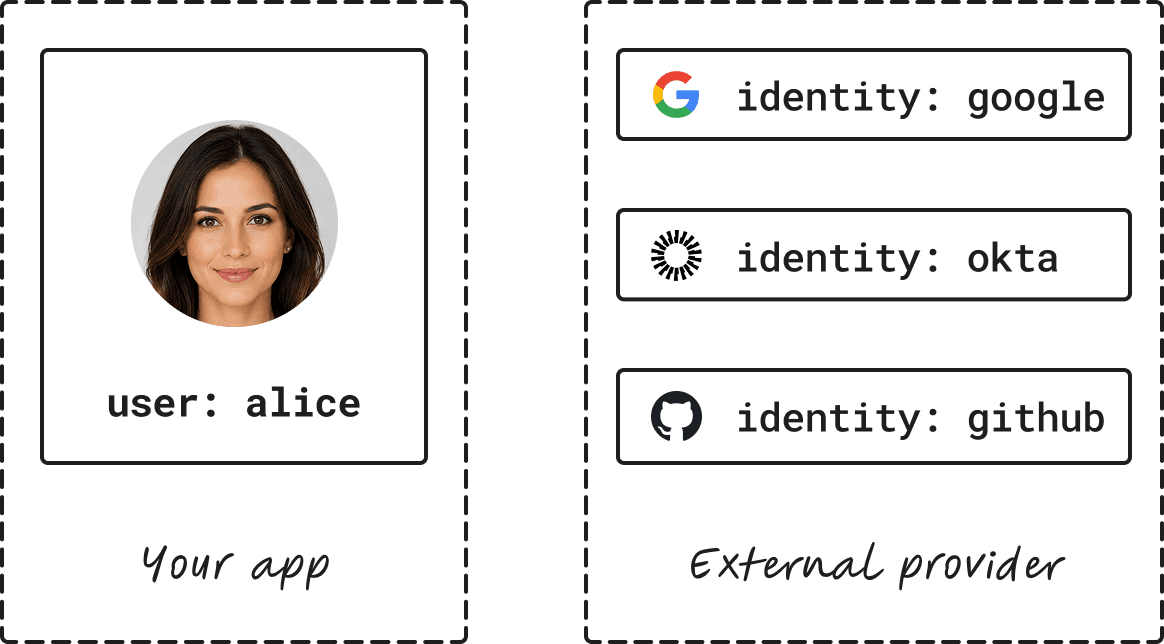
We've found it helps to separate users from identities:
- An identity is a user record in an external provider. It usually contains attributes like name, email, and group membership. An identity provider is therefore the source of truth for that record. Common providers are Okta, Google, Microsoft Entra, and GitHub.
- A user (or actor in Firezone parlance) is the record of a person in your application. It has similar attributes to an identity, such as email, name, and preferences. In contrast to identities, your application is the source of truth for that record.
Typically users, not identities, are what you attach access rules to.
So your application receives identities from these external systems, but your application owns its users. And modern standards lack a prescriptive way to link the two.
2. Standards help, but only so much.
If you've built or setup single sign-on (SSO) in the last decade, you probably used OpenID Connect (OIDC) or Security Assertion Markup Language (SAML).
(I won't cover SAML here because, well, (1) it's famously complex, and (2) is increasingly being replaced by OIDC. Just know that all of the identity problems that exist with OIDC also exist with SAML.)
OIDC helps your app answer one important question: which identity from this provider just authenticated?
It does this by defining a set of attributes that providers are required to send your app when the user authenticates. The two relevant ones are:
- the issuer identifier (
iss): Identifies the provider that issued the token. - the subject identifier (
sub): Identifies the authenticated user within that issuer.
So if Alice signs in with Google, your app might see:
{ "iss": "https://accounts.google.com", "sub": "1234567890" }
If Alice later signs in with Okta, your app might see:
{ "iss": "https://company.okta.com", "sub": "00uabc123" }
Together, (iss, sub) form the stable key your app uses to locate the identity that just signed in (assuming it already exists — more on that in part two).
But we're still left with: Are they the same Alice?
3. Avoid the email trap.
It turns out nearly all providers helpfully include the user's email in the attributes alongside the (iss, sub) pair. How convenient: do a lookup on email to find which Alice signed in. Problem solved, right?
Many apps do exactly that. And yes, it does work, for a while. But anyone familiar with authentication on the web knows using email as an identifier is a dangerous trap. Google's docs even warn against it:
Don't use email address as an identifier because a Google Account can have multiple email addresses at different points in time.
Only a few examples are needed to show why this is a bad idea:
-
A contractor is promoted to an employee
alice.contractor@gmail.com→alice.employee@company.com -
Someone changes their name
alice.walker@company.com→alice.doe@company.com -
A company changes domains
alice@oldcompany.com→alice@newcompany.com
In each case, the person is the same, the identity is the same, so the access rules should be the same. But if you used email alone to tell you that Alice just signed in, congrats. You just broke her CRM access at 4:30 PM on a Friday.
4. Use email as a one-time link.
A practical solution here is to treat email as a one-time link from identity to user. But, and this is the important part, it's important to verify the email before doing so.
OIDC has a specific attribute for exactly this purpose: email_verified. Unfortunately not every provider populates this consistently, so you can't trust it blindly. Instead, it's a good idea to verify ownership out-of-band (like a one-time passcode) before trusting it fully.
Before:
{
  "user": {
    "name": "Alice",
    "email": "alice@company.com",
    "identities": [
      { "iss": "https://accounts.google.com", "sub": "109876543210987654321" }
    ]
  }
}
After first Okta login:
{
  "user": {
    "name": "Alice",
    "email": "alice@company.com",
    "identities": [
      { "iss": "https://accounts.google.com", "sub": "109876543210987654321" },
      { "iss": "https://company.okta.com", "sub": "00u9vme99nxudvxZA5d7" }
    ]
  }
}
Under this design, email gets one job: help attach a new provider identity to an existing user at a specific point in time. After that, future logins use (iss, sub) directly. Once the identity is linked, email can change without breaking future logins for that provider.
5. Consider additional safeguards.
Email verification gets you most of the way there. A few more things that you may want to consider checking before linking a new identity:
- Was this provider configured by a tenant admin?
- Is the user active and accepting new identities?
- Was the user provisioned by directory sync?
- Does the user already have an identity from this provider?
What's next?
We hinted at it above, but all of this only works assuming the users authenticating are already in your app. If they're not, you need a robust way to do that. In part two of this series we'll be covering exactly that: provisioning, SCIM, and how access rules remain consistent throughout.